
Ad Formats
Learn about the various ad formats available on Snapchat, and choose the Snapchat Ads that best showcase your brand and allow you to connect with an engaged audience.
Ad Formats
Learn about the various ad formats available on Snapchat, and choose the Snapchat Ads that best showcase your brand and allow you to connect with an engaged audience.
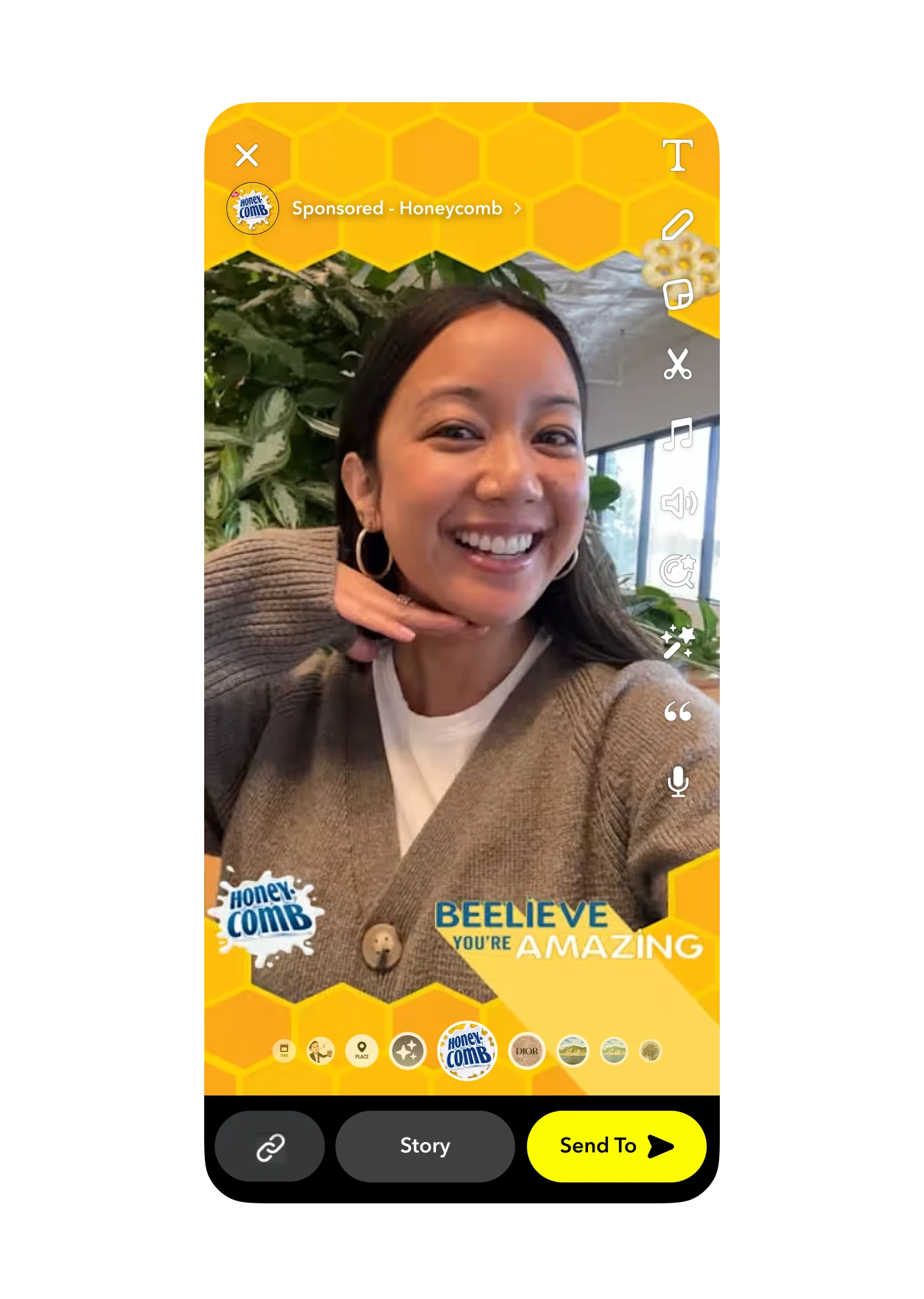
AR Filters
What is it?
AR Filters are accessible after a photo or video has been captured through the Camera by swiping through the post-capture carousel. The branded creative will overlay the Snap and add context to it.
Placements:
Camera — pre- & post-capture carousel
Primary Use Cases:
Upper Funnel
Static Filters Ad Requirements (Photo):
Composition size: 945x2048
File size: Under 300kb
File type: Transparent .png
Moving Images Filters Ad Requirements (Video):
Composition size: 720x1560
File type: .gif format
Duration: 1–3 seconds, looping seamlessly without any obvious start/end points
Frame rate: 2–15 fps
Total number of frames should be <20, regardless of frame rate (or as few as possible)
If using all 20 frames, lower framerate = longer animation, higher framerate = shorter animation)
Single Image or Video Ads
What is it?
A full screen, vertical mobile ad. Since they're fullscreen, they never compete for attention with other content or ads.
Placements:
Stories
Discover
Spotlight
Shows (In-Stream)
Chat Feed (Sponsored Snaps)
Primary Use Cases:
Upper Funnel
Mid Funnel
Lower Funnel
Ad Requirements:
File type: .mp4, .mov, .jpg, or .png
Aspect ratio: 9:16
Resolution: 1080x1920
Length: 3–180 sec

Tile Asset Requirements
Story tiles allow your brand to be discoverable in the Discover section of Stories.
Logo:
File type: .png
Resolution: 993px x 284px
Note: Asset should be formatted to fit the full height of the canvas OR fit the full width of the canvas and 50% or more of the height
Image:
File type: .png (up to 2MB)
Resolution: 360px x 600px
Headline:
Up to 55 characters with spaces
Please ensure your tile image has an 8-bit or lower bit depth
Emojis are allowed (these count toward the 55 character limit)
Story Asset Requirements:
File type: .mp4, .mov, .jpg, or .png
Aspect ratio: 9:16
Resolution: 1080x1920
Video Length: 3–180 seconds
Sponsored Snaps
What is it?
A Sponsored Snap is directly sent to a Snapchatter’s Chat Feed where they can view a full-screen Single Image or Video Ad and receive a message from your brand.
Placements:
Chat Feed
Primary Use Cases:
Upper Funnel
Mid Funnel
Lower Funnel
Ad Requirements:
File type: .mp4, .mov, .jpg, or .png
Aspect ratio: 9:16
Resolution: 1080x1920
Length: 3–180 sec
Optional Message Customizations:
Branded Chat Background: Recommended media dimensions: 1080w x 1920h. Images must be either PNG or JPEG.
Chat Message: Written message up to 500 characters
Auto Response: Written message up to 500 characters or a video asset. Recommended media dimensions: 1080w x 1920h. Videos must use H.264 encoding and be less than 180 seconds in duration.
Commercial Ads
What is it?
A video ad up to 180 seconds (the first six seconds are non-skippable) that appear within Snap’s premium curated content.
Placements:
Curated Content, such as Shows, in the Discover section of the Stories tab
Primary Use Cases:
Upper Funnel
Ad Requirements:
Video only: .mp4 or .mov (H.264 encoded)
Aspect ratio: 9:16
Resolution: 1080x1920
Length: 3–180 sec
Sponsored Lenses
What is it?
An interactive lens created with augmented reality that appears in the Camera carousel. AR Lenses take place before or while the content is being created.
Placements:
Camera — pre-capture carousel
Primary Use Cases:
Upper Funnel
Lens Branding Guidelines:
Lenses must feature a visible brand logo or brand name
Branding is required on both Face Lenses and World Lenses
Avoid placing the brand logo where it may be obscured by UI elements or the carousel on the bottom of the screen
The recommended logo placement is on the top left or top right under the UI elements
Snapchat adds a “SPONSORED” slug to the creative. This slug appears for 2 seconds and disappears and does not show up in Snapchatters’ photo or video Snaps.
With Lens Web Builder anyone can create an AR experience in minutes using hundreds of our free objects and animations
Story Ads
What is it?
Story Ads allow you to reach Snapchatters with a series of ads appearing between content or with a branded tile in Snapchat’s Discover section that opens up to a collection of 1–10 videos or images.
Story Ad Tiles also include a Call to Action (CTA) button for App Install and Website Attachment types.
Placements:
Stories and Discover (Note: must include a Tile to deliver in Discover Feed)
Primary Use Cases:
Upper Funnel
Mid Funnel
Lower Funnel